
GDPSC Multi Tenancy
The Multi-Tenancy feature allows a single Front-Office instance to communicate with different Acta-Nova Back-Office instances within test systems. This reduces the number of required instances when multiple configurators are working on processes in parallel and need to test them.
In a standard setup, a Front-Office instance is connected to one Back-Office instance. In a multi-tenancy environment, a user can connect the Front-Office instance (for themselves only) to their own Back-Office instance in order to use their own processes and forms.
Shared across the entire instance:
- CMS data
- Messages
Individual to each user:
- Forms (incl. Formgrid and Formstaging)
- Cases
- Tasks
Configuration & Prerequisites
Euca Client
- A project must be created in the EUCA Client
- A tunnel must be created and opened for the prefix/shorthand
- the instance itself does not need to be installed and started
Front-Office
- The multi-tenancy feature must be active in the Front-Office instance (
feature_multi_tenancy) or enabled via the environment variableANDP_MULTI_TENANCY_ENABLED=true.
If the user wants to connect to their own Acta-Nova instance, they must use the custom tool ANDP Admin in the CMS (where the Formgrid is also located). Here, they can/must set the following:
- their prefix / shorthand (visible in the EUCA Client)
- the Acta-Nova Base URL (through which the Back-Office endpoints are reachable - relative to the local setup)
- the Front-Office Base URL - This must be stored in the user's own Acta-Nova instance
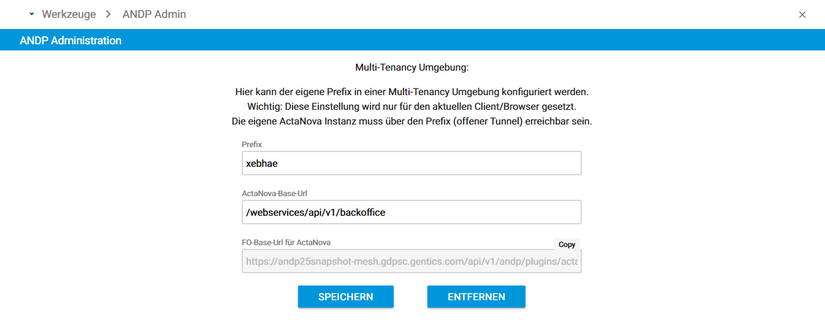
Once the settings are saved (important: they are only saved for the current client and browser), the configured Acta-Nova instance is accessed in the background. This means that initially, forms will no longer load because the corresponding forms from the user's own Back-Office instance have not yet been published. Therefore, the next step is Formstaging or publishing from Acta-Nova. If the settings are removed, the default Back-Office instance (which may be configured on the multi-tenancy environment) becomes active again.