
This page describes the interface between the Acta Nova back office and the Gentics CMP front office on a conceptual level: which interactions exist, which direction they go, what is stored on which side, and how the two systems authenticate each other. It is the counterpart to the RUBICON documentation of the Dialog Portal plug-in’s endpoints and configuration parameters.
|
Note
|
The exact request and response formats of the Acta Nova Mesh plugin are not part of this guide. An OpenAPI specification for the ANDP APIs is planned and will be published with the other Open API specifications. |
Where the integration lives
On the front-office side, all communication with Acta Nova is implemented in the Acta Nova Mesh plugin
(acta-nova-plugin), a plugin of Gentics Mesh. The plugin
-
exposes a REST API under
/api/v2/{andp-project}/plugins/acta-nova/…that is used by Acta Nova (inbound) and by the portal (outbound, proxied under/api/acta-nova/…), -
owns the ANDP Mesh project with its schemas and root folders (
/actanova/forms,/actanova/notifications,/actanova/tasks,/actanova/reports, …), which it creates on start-up, -
calls Acta Nova’s Dialog Portal endpoints with an HTTP client that can present a client certificate and a signed JWT,
-
sends e-mails and push notifications,
-
runs the clean-up tasks for drafts, notifications, reports, transactions, terms-of-use and wizard data.
On the back-office side, the Dialog Portal plug-in of Acta Nova provides the matching endpoints (form
initialisation, validation, submission, search, business partner data, user metadata, …) and the outbound
calls (publish form, create notification, publish content), configured through the DialogPortal_*
parameters described in the RUBICON installation manual (chapter Parameter für das Acta Nova Dialog
Portal) and the JWT modules described in the RUBICON customizing manual.
Interactions at a glance
| Interaction | Direction | What happens |
|---|---|---|
Publish form |
AN → FO |
Acta Nova sends the form’s schema and UI schema ( |
Initialise form |
FO → AN |
When a user opens a form, the plugin asks Acta Nova to initialise it ( |
Save draft |
FO only |
On every page change the form data and uploaded files are stored in Mesh ( |
Validate / refresh |
FO → AN |
The saved data is sent to Acta Nova for validation ( |
Pre-upload files |
FO → AN |
Large files can be uploaded to Acta Nova before the submit (form instance contents), so the final submit stays small. Timeouts and limits must be configured in Mesh, portal and reverse proxy (see File upload configuration). |
Submit form |
FO → AN |
The plugin saves, validates and then submits the data ( |
Search, lazy catalogs, autocomplete |
FO → AN |
Expert-search forms ( |
Reports |
FO → AN → FO |
For Excel results of an expert search the plugin requests a report ( |
Create message (notification) |
AN → FO |
Acta Nova sends one or more notifications ( |
Read messages, mark as read, delete, move |
FO only |
The Messages MicroApp works on the notifications stored in Mesh. Document downloads from a message are
fetched from Acta Nova on demand ( |
Tasks |
FO → AN |
The Tasks MicroApp lists the user’s pending activities live from Acta Nova ( |
Business cases and documents |
FO → AN |
The Business Cases MicroApp lists the user’s records ( |
Organisations |
FO → AN |
The organisations a user may act for ( |
Business partner existence, onboarding |
FO → AN |
On login the portal checks whether a person exists for the Keycloak user
( |
User metadata and dynamic roles |
FO → AN |
With |
Publish content |
AN → FO |
Acta Nova can push binaries (for example documents to be linked from pages) into Mesh
( |
Trigger form |
FO → AN |
A form can be triggered from the portal without user input ( |
CSV upload |
FO → AN |
Bulk data can be uploaded as CSV and processed by Acta Nova ( |
Payments (optional) |
FO → PSP, FO → AN |
For forms with fees the plugin integrates a payment service provider (currently PostFinance Checkout):
it creates a transaction, embeds the payment page, and only submits the form to Acta Nova after the
transaction is confirmed ( |
Terms of use, wizard |
FO only |
Acceptance of the terms of use and completion of the first-login wizard are stored per user in Mesh and can be reset with the terms-of-use custom tool. |
Health check |
FO → AN |
The plugin’s ready check calls Acta Nova’s |
Form publishing in detail
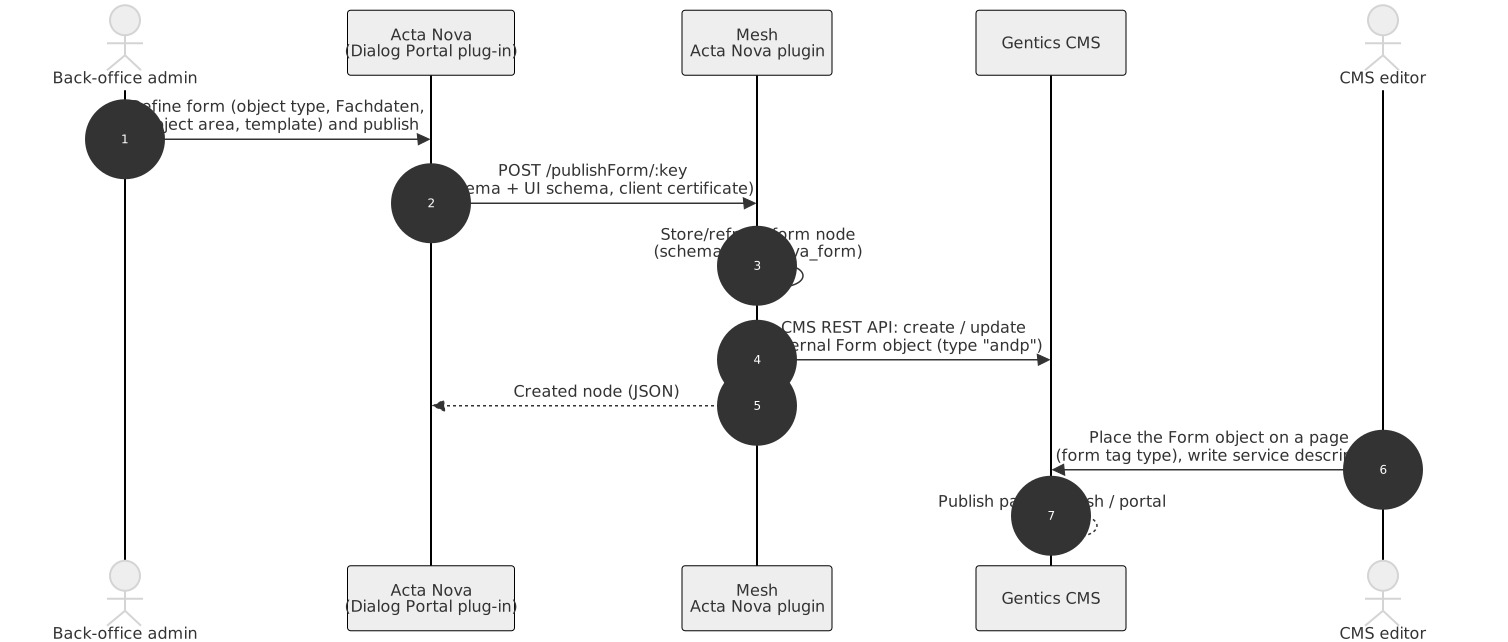
Since ANDP 8.5, ANDP forms are external forms of Gentics CMS. The plugin needs access to the CMS REST API
and a target node in which the Form objects are created (cms.restApiBaseUrl, cms.restApiUser,
cms.restApiPassword, cms.restApiNodeId). The node must have the Forms feature enabled, the andp form
type assigned and a default folder for external forms. Acta Nova publishes forms in culture codes
(de-AT, de-CH, …), which must exist as CMS languages or be mapped. All of this is described in
Configuration for forms.
Form initialisation, validation and submit in detail
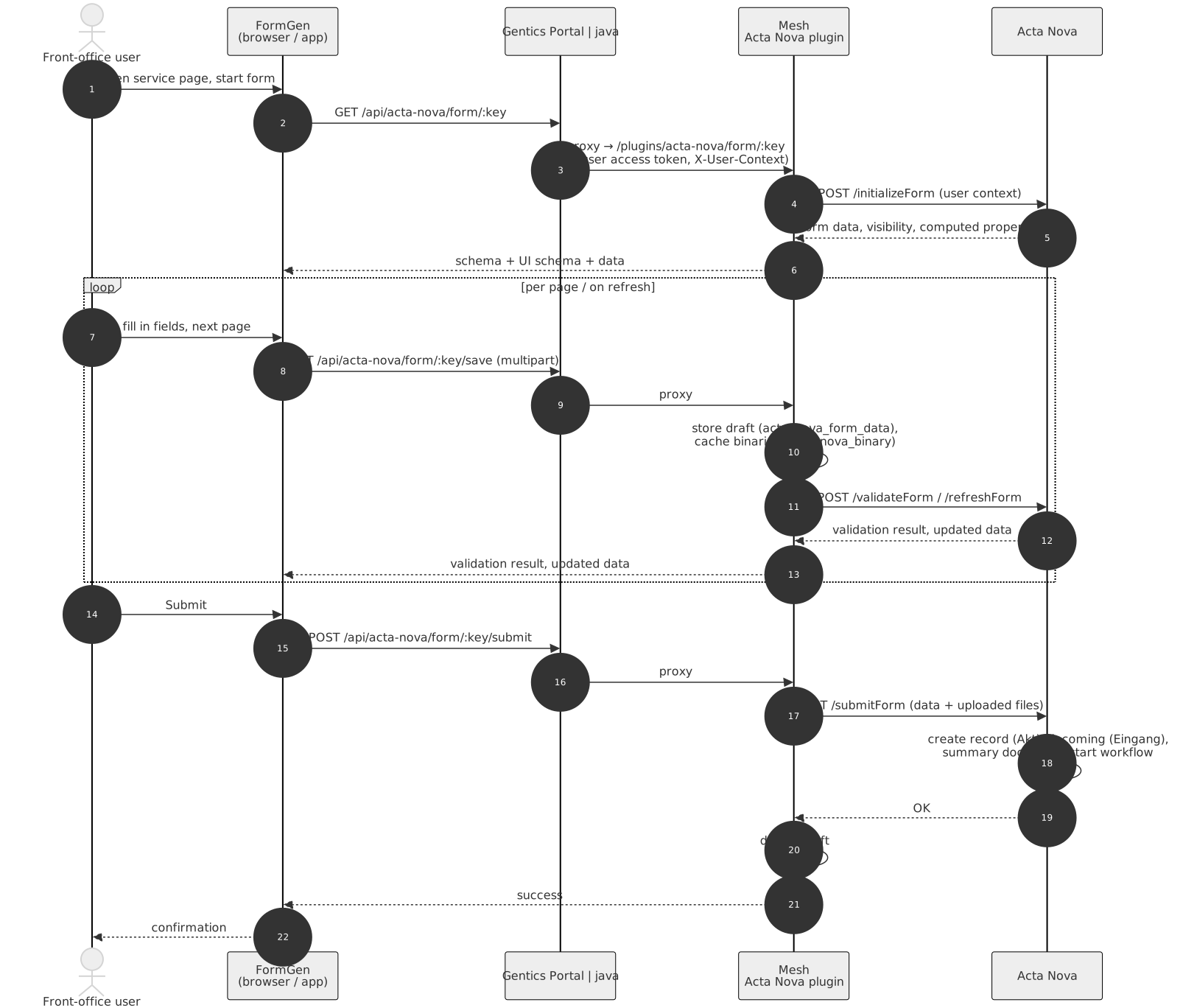
Key points:
-
The browser (FormGen) only ever talks to the portal. The portal proxies
/api/acta-nova/*to the plugin and adds the user’s Keycloak access token and theX-User-Contextheader (culture). The plugin derives the user ID and whitelisted token claims from the access token and forwards the combined user context to Acta Nova. -
Acta Nova is the source of truth for the form’s behaviour: preconditions, initial data, prefill, visibility and editability rules, computed properties and validation all run in the back office. FormGen renders what the back office returns.
-
The front office is the source of truth for the draft: data and files are stored in Mesh until submit.
-
A submit is atomic from the user’s point of view: save, validate, submit, delete draft. If Acta Nova rejects the submit with validation errors, the user stays on the form and sees them.
-
For communication forms (answers to messages), the business object ID of the record or incoming is part of the URL (
/form/:key/businessObject/:boId/…) and of the user context, so Acta Nova initialises the form with the record’s data and files the answer in the same record.
What is stored where
| Data | Stored in | Notes |
|---|---|---|
Form definitions (fields, pages, rules) |
Acta Nova |
published schema is cached in Mesh and mirrored as CMS Form object |
Submitted form data, records, documents |
Acta Nova |
the system of record |
Form drafts and uploaded files before submit |
Mesh |
per user, form and business object; cleaned up |
Messages (notifications) |
Mesh |
with reference to the Acta Nova document; deleted by user or clean-up |
Tasks, business cases |
Acta Nova |
queried live, never stored in the front office |
Persons, organisations (business partners) |
Acta Nova |
Keycloak only knows the account |
Accounts, credentials, identity-provider links |
Keycloak |
|
Dynamic roles |
Acta Nova |
cached on the Mesh user for the session |
Pages, service descriptions, translations |
Gentics CMS → Mesh |
|
Terms-of-use acceptance, wizard state, favourites, device push tokens |
Mesh |
per user ( |
Payment transactions |
Mesh (state) and the payment provider |
Authentication between the systems
Front-office user → portal → Mesh
The user logs in to Keycloak (OIDC). The portal holds the tokens in cookies and sends the access token to Mesh; the Mesh Keycloak plugin validates it and maps the user to a Mesh user with roles. The plugin receives the authenticated Mesh user and the raw token on every request.
Mesh plugin → Acta Nova
Two independent mechanisms can be enabled:
-
Back-office JWT: the plugin signs a JWT with its private key and sends it in a configurable header; Acta Nova validates it with the plugin’s public key or certificate (
DialogPortal_EnableJWTAuthentication,DialogPortal_FrontOfficeCertificate_*/DialogPortal_FrontOfficePublicKeyBase64on the Acta Nova side;backOfficeAuthenticationOptionson the plugin side). The plugin generates an RSA key pair on first start if none is configured.
The acting user is never authenticated towards Acta Nova individually; Acta Nova trusts the front office
and takes the user from the X-User-Context header.
Acta Nova → Mesh plugin
Inbound calls (publish form, notifications, publish content, report results) are protected by:
-
Back-office JWT: when back-office authentication is enabled, Acta Nova signs its requests with its FormServer certificate (
DialogPortalJwtTokenCreatorModule,DialogPortalOutgoingJwtAuthenticatorModule) and the plugin validates issuer, audience and signature.
Administrative plugin endpoints (import/export of forms, migration, clean-up) require a Mesh administrator token or, for clean-up, a configured secret (see Clean-up handler).
Extending the integration
Projects that need behaviour beyond configuration have two extension points:
-
on the front-office side, the custom Acta Nova plugin (
acta-nova-plugin-custom): a Mesh plugin that extends the Acta Nova plugin and can register new handlers or override services (HTTP service, mail service, hooks) using Dagger dependency injection; -
on the back-office side, Acta Nova dynamic modules and configuration blocks as described in the RUBICON customizing manual and guideline document (hooks for init and submit of forms, filtering of the business case list and activities, dynamic roles, workflow extensions).
The RUBICON guideline document recommends solving as much as possible through configuration and keeping custom code minimal and in the designated extension points; the same applies on the front-office side.